
Upwork connects: how to spend them without wasting them
Stop wasting Upwork connects on low-probability bids—learn which postings are worth your limited credits based on competition and bid cost.

Updated on
2026-09-09
Stop wasting Upwork connects on low-probability bids—learn which postings are worth your limited credits based on competition and bid cost.
Updated on
2026-09-09
Find the low-hanging, quick-wins and 10x your freelancing business!
Get the ChecklistLet me put a number on the thing you keep ignoring.
At current rates, freelancers spend $0.15 per connect, and most jobs cost 6 to 16 connects just to apply. Do the math on a bad month. According to BidPilot's connects strategy breakdown, if you're not being strategic, you can burn through $50 to $100 a month in connects without landing a single job.
A hundred bucks. For nothing. For the privilege of being ignored by strangers.
And here's the part that stings... most of us do it on autopilot. We see a fresh posting, feel that little jolt, and slam the apply button before anyone else can. It feels smart. It feels fast.
It's the worst move you can make.
YouTuber Michael Elliott dug into the timing data and found that 47% of all Upwork proposals are sent within the first five minutes of a job posting. Nearly half the platform racing to be first. Their win rate? 7.2%. The lowest of any bracket. The freelancers who apply two to four hours later win at 24.3%, more than three times higher.
So the crowd is sprinting in the exact wrong direction, connects in hand, wallets open.
Why do we do it? In the book Predictably Irrational, Dan Ariely writes that our irrational behaviors are neither random nor senseless, they are systematic and predictable. We make the same mistakes over and over because of the basic wiring of our brains. Panic-bidding is one of those wired-in mistakes.
The fix isn't more discipline or more willpower. It's a filter. GigRadar's benchmarks suggest focused soloists can sustain 3 to 5 targeted proposals a day. Targeted. Not fifteen sprayed at anything with a dollar sign.
The next three sections are that filter. Three signals. Under two minutes. Let's go.
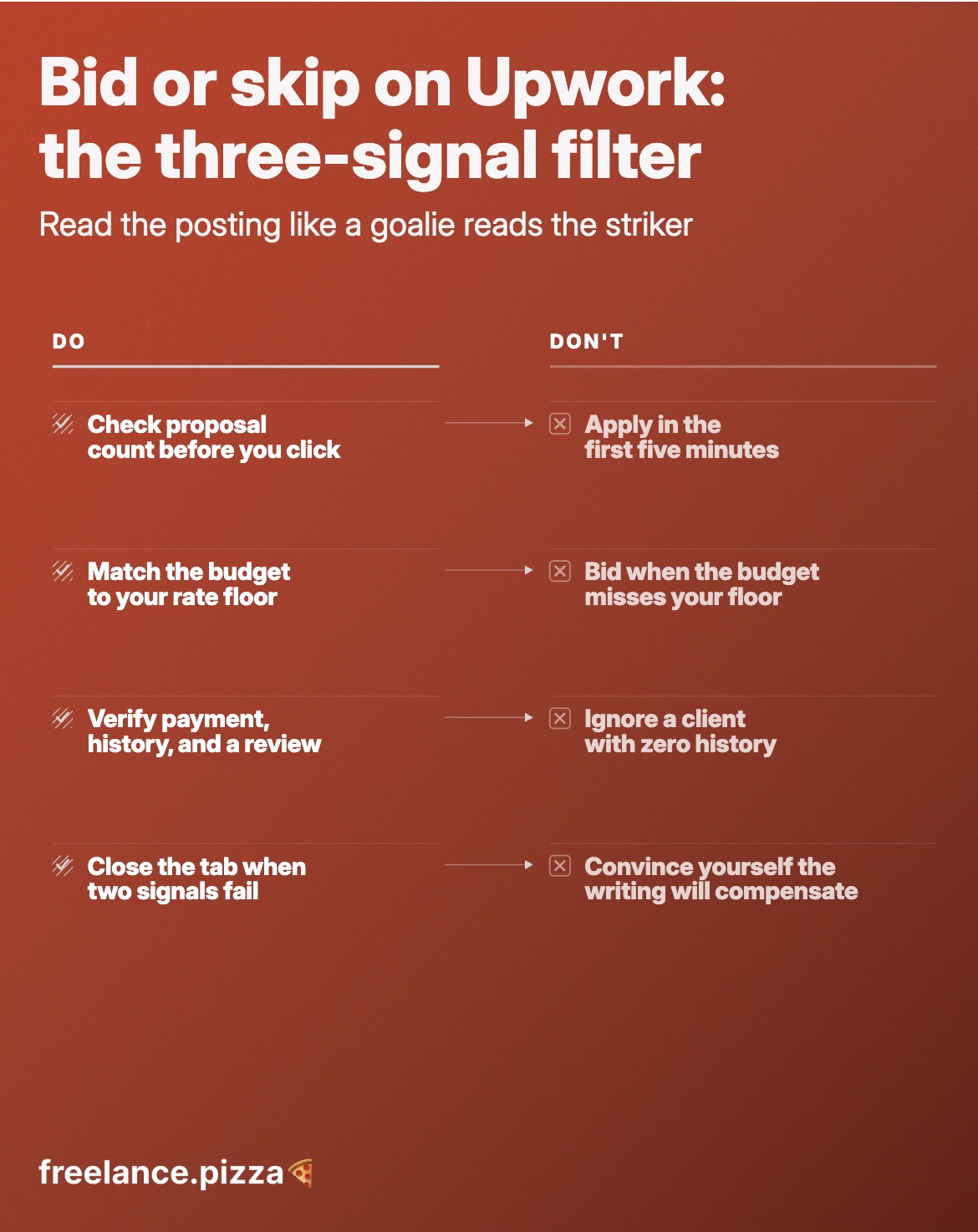
First thing you look at, before the pretty job description seduces you, is the proposal count.
Upwork shows you how many people have already bid. This number is your goalie read. A goalie doesn't guess which way to dive at random. He watches the striker's hips, his plant foot, the angle of the shoulders, and commits before the ball is even struck. The proposal count is the striker's hips. It tells you where this is going.
Fifty-plus proposals already in? You're diving into a wall of bodies. Your message is buried on page four, unread, connects gone.
Under ten, posted a couple hours ago? Now you've got a striker who's telegraphed an open corner.
Here's why low competition matters more than it looks. GigRadar notes that successful bids mean more completed projects and standout reviews, which boosts your profile and makes future bids easier to win. It's a snowball. The more you win, the easier winning gets. So every connect you spend on a low-competition posting is buying two things: the job, and a slightly stronger profile for the next one.
I stopped treating the proposal count as a nice-to-know and started treating it as a hard gate. Under ten, keep reading. Over fifty, close the tab. That one rule pulled my whole bidding day from thirty frantic applications down to five that actually had a pulse.
Now, a caveat, because the competition read cuts both ways depending on the prize. Michael Elliott makes the point sharply: if the contract is worth $5,000 and connects cost pennies, why are you boosting with 16 connects? He says he's boosted with hundreds of connects on a single proposal, because if you win a $5,000 contract, who cares if you spend $50 to get it? That's not a cost. That's the best return on investment you'll ever make.
So the competition signal isn't "always avoid crowds." It's weigh the crowd against the prize. Small job, big crowd? Walk. Huge job, big crowd? That might be the one you go all in on.
Signal one told you how many people you're fighting. Signal two tells you whether the fight is even worth winning.
Look at the budget. Then look at what you charge. If a client posts $500 for a project you'd quote at $2,500, you already lost, you just haven't spent the connect yet. Bidding is throwing pennies down a well and calling it strategy.
The trap is that a low budget doesn't look low in a vacuum. It looks low next to your rate. And that's exactly the lever you should be pulling. Dan Ariely, again in Predictably Irrational, writes that humans rarely choose things in absolute terms. We don't have an internal value meter. We focus on the relative advantage of one thing over another and estimate value from there.
Clients do this too. Which means the budget line isn't a fixed law, it's an anchor. A client who wrote "$500" but describes a $2,500 scope is sometimes just a client who anchored themselves badly. Your proposal can re-anchor them, if the gap is small enough to bridge. If the gap is a canyon, keep your connect.
So the check is quick. Ask three things:
Two yeses and a maybe, spend the connect. A hard no on budget-to-rate, walk.
If you want to sharpen your sense of what postings in your niche actually pay, tools like UpHunt sit on a live dataset of over 4 million Upwork jobs and 1.5 million freelancer profiles, real market numbers a generic gut-check can't give you. Use that to calibrate your "striking distance" so you're not walking away from money that was actually there.
Find the low-hanging, quick-wins and 10x your freelancing business!
Get the Checklist
You've cleared the crowd and the budget. Now the last read: is there a real, paying human on the other end, or a ghost?
This is the goalie noticing the striker has no plant foot set, no follow-through, nothing behind the shot. Three trust flags tell you fast:
Why be this strict? Because your credit stack is tiny and finite. SoloWise points out that connects used per job usually run 4 to 8 or more, so even bidding the smallest gigs at 4 connects each, you can only submit around 12 proposals with your registration bonus and 2 with your monthly free connects. That's it. Two free swings a month.
You cannot afford to spend even one of those on a client who was never going to hire anyone.
And remember the money side. BidPilot's figures put it plainly: $0.15 per connect, 6 to 16 connects per job, $50 to $100 a month evaporating if you're careless. A payment-unverified ghost posting can eat 16 of those connects and give you nothing but a read receipt that never comes.
Three flags. Ten seconds. If the client fails two of them, you already have your answer.
Okay, so now you've got three reads: the crowd, the budget, the client. What do you actually do with them?
Simple scoring. Each signal is a pass or a fail. Two or more fails, you pocket the connect. Full stop. No agonizing, no "but maybe this one's different." The rule does the thinking so your panic doesn't.
That last one is the whole point. GetMany's 2025 guide confirms connects still cost $0.15 each and a standard proposal runs 4 to 16 depending on demand. Every "no-go" you honor is real money back in your pocket for a bid that actually converts.
And it does convert. Freelancers who run their postings through a proper filter typically report a 2 to 3x reply rate within a week. Same person, same portfolio, same connects. The only thing that changed is what they refused to bid on.
Here's the thing nobody warns you about the filter. Run it for a week and it stops being a checklist you consult and starts being reflex. The proposal count, the budget gap, the missing verified badge... you clock them at a glance, the way that goalie reads the hips before the striker even swings his leg. Soon you see the red flags before you even click the posting.
Join 20.000+ freelancers in our weekly value bomb, and grow your frelance income with confidence!
By entering your email address you acknowledge to subscribe to the FreelancePizza mailing list.
You will be sent a confirmation (opt-in) email to confirm your email. You can unsubscribe any time.
