You think you're billing 30 hours a week. Your calendar says so. You feel like you're working constantly (because you are). But here's the thing: when you actually track your time, you might discover you logged only 18 billable hours and 22 hours of non-billable work.
That gap? That's your income problem. And most freelancers never see it coming.
The Hidden Time Drain Nobody Talks About
Let's be honest. Freelancing sounds amazing on paper. You're your own boss. You work when you want. You do the work you love.
Then reality hits.
You spend 10+ hours a week hunting for work across LinkedIn, Upwork, and job boards. You write proposals. You answer emails from clients (who always email when you're deep in focus mode). You update invoices. You chase late payments. You attend client meetings that could have been emails.
None of this is billable. None of this pays the bills directly. Yet all of it keeps your business running.
Most freelancers have no idea where their hours actually go. Without measurement, you're guessing at your profitability. Turns out, your guesses are probably wrong.
The real cost isn't just lost income. It's burnout from invisible, unpaid work that eats into your focus time and kills your ability to do the work you actually love.
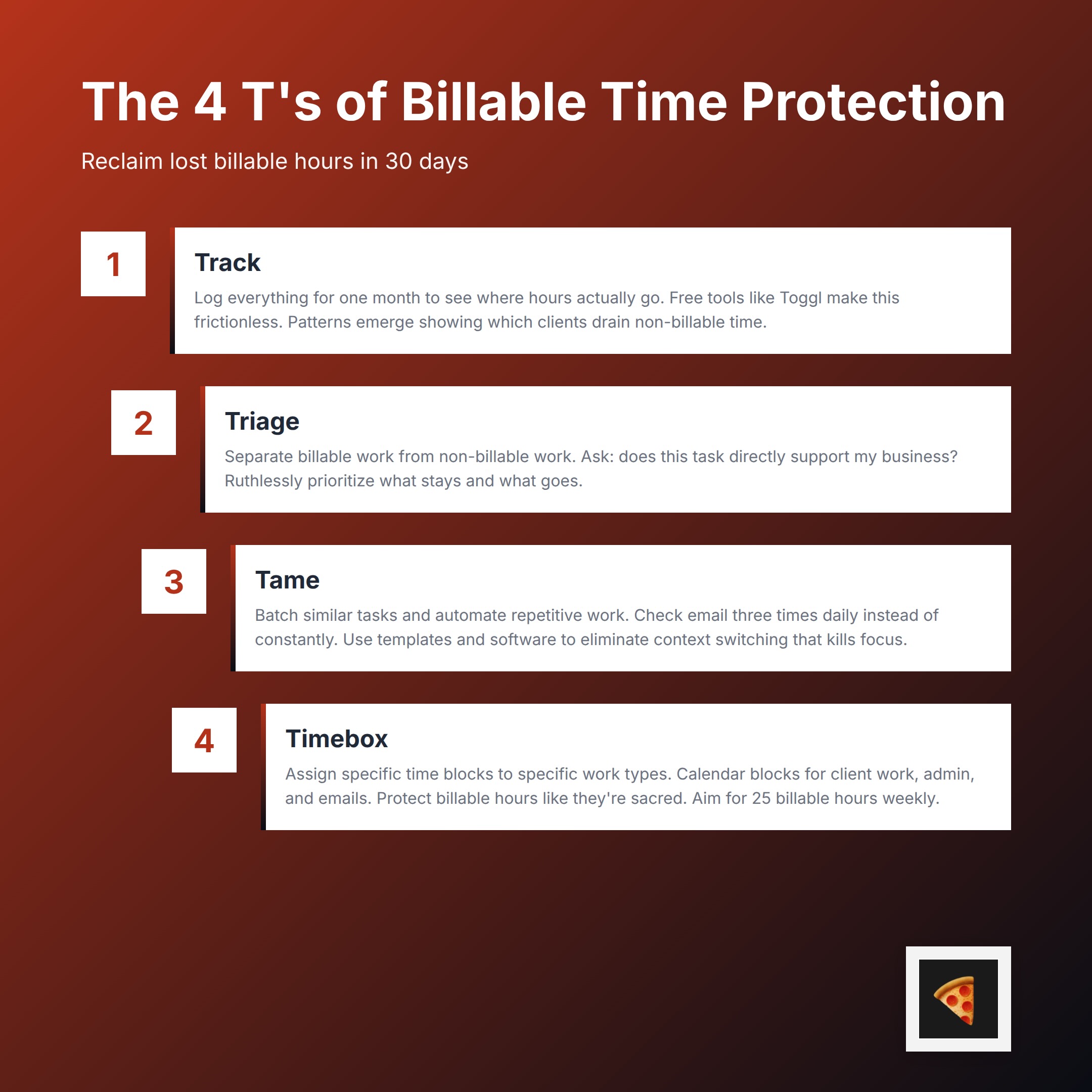
Meet the "4 T's of Billable Time Protection"
Here's the good news: you can fix this.
The solution isn't complicated. It's a simple framework with four parts that work together to protect your billable hours and stop wasting time on work that doesn't pay.
Track. See where your hours actually go.
Triage. Separate billable from non-billable work. Prioritize ruthlessly.
Tame. Automate and batch non-billable tasks so they don't interrupt your flow.
Timebox. Create boundaries that protect your billable hours from daily chaos.
Freelancers who implement this framework typically reclaim 5 to 7 hours of billable time per week within 30 days. That's real money back in your pocket.
Let's break down each part.
T #1: Track (Build Visibility as Your Foundation)
Here's the uncomfortable truth: you can't improve what you don't measure.
Tracking time is non-negotiable. Without it, you're flying blind on profitability. You're guessing. You're hoping. You're definitely underestimating how much time your "small" clients actually cost you.
Tracking time gives you an objective view of how you're actually spending your days. Free tools like Toggl make this frictionless. There's no excuse to skip this step.
Start simple. Use your time-tracking tool to log everything for one month. Billable client work. Email. Proposal writing. Admin tasks. (There are a lot of admin tasks.)
Round to 15-minute increments. Don't get weird about precision.
Here's what happens after 30 days: patterns emerge. You'll spot which clients drain non-billable time. You'll see which admin tasks repeat daily. You'll discover what kills your focus the most.
One real example: a freelance designer discovered that one "small" client was costing 30% more non-billable time than anyone else. Unclear requirements. Endless email chains. Too many revision cycles. Once they saw the data, they renegotiated the contract. Same client, better boundaries, happier designer.
That's the power of tracking. It gives you leverage to make change.
Common mistake to avoid: Don't start too granular. Tracking to the minute creates friction. You'll stop doing it. Round to 15-minute blocks and call it done.
T #2: Triage (Separate, Prioritize, and Protect)
Now that you can see your hours, it's time to separate billable work from non-billable work.
This matters more than you think.
Billable hours are time you can directly invoice. That's client work. That's money in your pocket.
Non-billable hours keep your business running but don't pay the bills directly. Proposals. Email. Admin. Invoicing. Marketing. Client meetings that aren't part of the scope.
Here's the hard part: not all non-billable work is equal.
Some non-billable tasks are necessary. You have to send invoices. You have to chase down late payments. You have to hunt for new clients or you'll run out of work.
Other non-billable tasks are just habits. You check email every 15 minutes instead of batching it three times a day. You attend meetings that should have been emails. You scroll job boards manually instead of using tools that find opportunities for you.
Your job in this step is simple: ruthlessly prioritize.
Ask yourself about each non-billable task: Does this task directly support my business? Or is this just a habit I can break?
If it directly supports your business, keep it. You'll tame it in the next step.
If it's a habit or a luxury, cut it.
This separation helps you see which non-billable work is actually costing you billable hours. Once you see it, you can make better decisions about what stays and what goes.
Freelancing 101:
Get more clients with the Freelance Client Checklist
Find the low-hanging, quick-wins and 10x your freelancing business!
Get the ChecklistT #3: Tame (Batch, Automate, and Delegate)
You can't eliminate all non-billable work. But you can stop letting it interrupt your day.
The goal here is simple: batch or automate everything you can.
Batching means doing similar tasks together instead of scattered throughout the day. Check email three times a day at set times (9 AM, 12 PM, 4 PM). Spend one hour on admin every Friday afternoon. Answer all client messages in one block.
This sounds simple. It's harder than you'd think. But it works.
Why? Because every context switch kills your focus. If you're deep in client work and you hear an email notification, your brain stops. You switch to email mode. You switch back to client mode. You've lost your flow state. You've lost efficiency.
Batching eliminates the switching. You check email when you decide to check email. Not when your email app decides to interrupt you.
Automation means using tools to do the work for you. Invoicing software that automatically sends reminders for late payments. Proposal templates that reduce proposal writing time from 45 minutes to 10 minutes. Job-hunting tools that scrape opportunities from multiple platforms while you sleep (instead of spending 10+ hours a week doing this manually).
Tools that automate timesheets and repetitive tasks can greatly boost productivity and income for freelancers. You're not working smarter if you're still doing manual work that software can handle.
Examples:
Set up a proposal template. Save it. Reuse it. Customize only the client-specific details.
Use invoice software that automatically sends reminder emails for overdue payments.
Use a time-tracking tool that automatically captures billable vs. non-billable time so you don't have to remember.
The magic here is that automation doesn't require you to do anything differently. It just happens while you work.

T #4: Timebox (Create Boundaries That Stick)
Now here's where most freelancers fail. They track. They triage. They automate. Then they lose discipline.
Timeboxing is your safety net.
Timeboxing means assigning specific blocks of time to specific types of work. Not "I'll do admin today." Instead, "I'll do admin from 4 PM to 5 PM on Fridays."
Specific. Time-limited. Protected.
Here's why this matters: without boundaries, non-billable work expands to fill your day. You sit down to do one quick admin task and suddenly three hours have passed. A client email triggers another email. That triggers a call. That requires a follow-up proposal.
Boundaries stop this.
Your calendar should show:
Client work time (protected, do not disturb)
Admin time (batched, contained, specific hours)
Email and communication time (specific check-in times only)
Business development time (if you're hunting for clients)
Protect your billable hours like they're sacred. Because they are. They're how you make money.
Working a maximum of 25 billable hours a week is sustainable. The rest of your time goes to non-billable work, breaks, and focus time. This isn't laziness. It's sustainable work structure.
If you're not hitting 25 billable hours per week, you need either to raise your rates or reduce non-billable time. (Or both.)
The Real Problem You're Solving
Let's zoom out for a second.
The real problem isn't that you don't have enough time. It's that you don't have visibility into where your time goes.
Once you track it, triage it, tame it, and timebox it, something shifts. You feel in control again. You see which clients are actually profitable. You see which tasks are actually necessary. You stop guessing.
And you stop burning out.
Freelancers who routinely analyze their hour categorization can price smarter and win better contracts. You're not just protecting billable time. You're building a more profitable business.
Start This Week
You don't need to implement everything at once. Pick one step:
This week: Download a time-tracking tool (Toggl is free). Log your hours for three days. Just three days. See what happens.
Next week: Look at your tracking data. Identify one non-billable task that's killing your focus. Cut it or batch it.
Week three: Automate one task. One invoice reminder. One proposal template. One job board that you stop checking manually.
Week four: Timebox your work. Calendar blocks. Specific times. Stick to them.
Within 30 days, you'll reclaim hours that you thought were gone forever.
And you'll remember why you became a freelancer in the first place. To do work you love. Not to hunt endlessly for work or manage chaos.
The 4 T's aren't complicated. They're just discipline applied to time.
Start tracking. The rest will follow.