You're Sending Proposals Into the Void. Here's How to Fix That.
Let's be honest. You send 10 proposals. You get 1 response. Maybe.
Freelancers spend over 10 hours every week hunting for work. A huge chunk of that time? Writing proposals that disappear into the internet never to be seen again.
The frustrating part? It's probably not your fault.
According to Upwork's official guidance on proposal creation, "clients decide on freelancers primarily based on proposal cover letters." This means most freelancers are losing jobs before they even get a chance to talk about their experience.
You're caught in the feast-or-famine cycle. One month you're swamped. The next month you're scrambling. The real problem isn't that clients don't want to hire you. Your proposals just don't stand out enough to get noticed.
This guide is for you if you're a developer, designer, or writer making 40% or more of your income from freelance work. You want faster responses. You want more consistent income. And you definitely don't want to spend another two hours crafting a proposal that gets ignored.
Here's what you'll learn today:
- 5 core proposal components that actually get responses
- 7 ready-to-use templates (for developers, designers, and writers)
- Response rate benchmarks to track your progress
- A simple checklist before you hit submit
By the end, you'll move from a 3-10% response rate to 20-40% in the next 30 days.

What You'll Need Before You Start
You don't need fancy software or a degree in copywriting.
You need:
- Access to the job posting you're responding to (Upwork, LinkedIn, niche boards)
- 10-15 minutes per proposal to customize
- Your portfolio link (or examples of past work)
- This guide
The biggest blocker? You probably think proposal writing takes forever. It doesn't have to. Customizing a template takes 15 minutes. Writing from scratch takes an hour. We're going with 15 minutes.
Another worry: "What if I don't have examples to share?" We'll cover that in Step 4.
Step 1: Learn the 5-Part Formula That Works
Before you write a single word, you need to understand the blueprint.
Every winning proposal has the same five parts. Think of it as a skeleton. You fill in the bones with your own words and examples.
Here's the formula:
- Hook: Your opening sentence (the part that makes them want to keep reading)
- Plan: How you'd actually solve their problem
- Proof: Evidence that you can do what you're saying
- Fit: Why you specifically are the right choice
- CTA: What happens next (your call to action)
Why does this matter?
Research from GigRadar's analytics guide shows that proposals with all five components tend to perform better. Proposals missing key parts drop significantly in effectiveness.
This framework ensures you cover everything a client needs to see.
Step 2: Write a Hook That Actually Stops Them
You have two sentences. Maybe three.
That's your hook. This is where most proposals fail. They start with something generic like "I'm very interested in your project and have 5 years of experience."
Yawn.
According to Upwork's research, cover letters are the first thing clients read. If they don't see why you're different in the first two sentences, they move to the next proposal.
Here's what a good hook does:
- Shows you actually read the job posting
- Mentions one specific thing about their project
- Explains why you're excited (or why it's relevant to you)
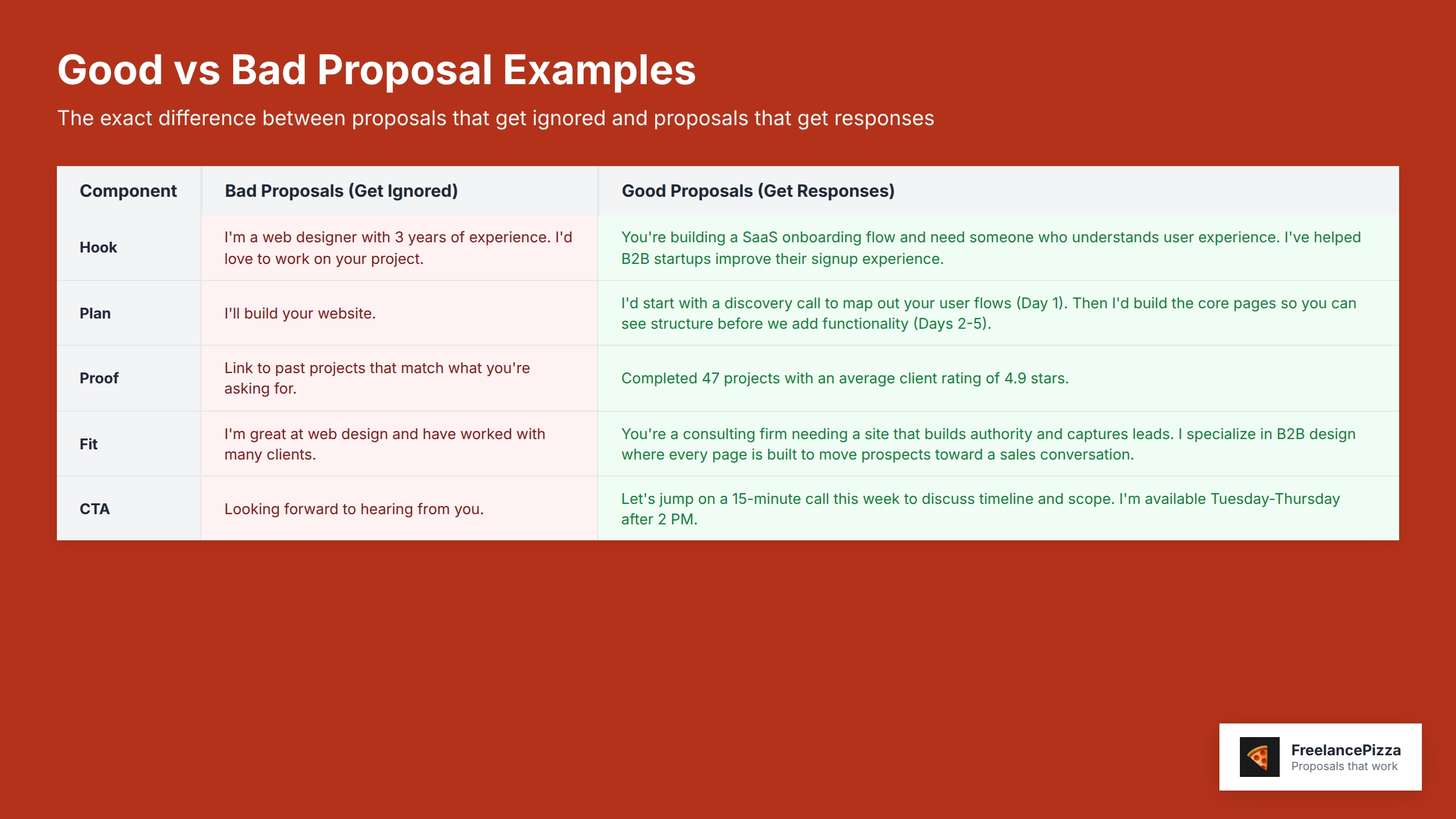
Bad hook: "I'm a web designer with 3 years of experience. I'd love to work on your project."
Good hook: "You're building a SaaS onboarding flow and need someone who understands user experience. I've helped B2B startups improve their signup experience."
See the difference? The second one proves you understood their problem.
Here are three hook templates you can steal:
"I noticed you're looking for [specific thing]. I've done this exact thing [number] times."
"You need [their goal]. My last three projects focused on exactly this."
"[Client name], most people approaching this try [common approach]. I take a different angle because [your reasoning]."
Pick one. Fill in the blanks. Don't overthink it.
Step 3: Show Your Plan (How You'd Actually Do the Work)
Now they're interested. The next question in their head: "How would you actually approach this?"
This is where you show your thinking.
Don't just say "I'll build your website." Say what that means. Walk them through your process.
Your plan should take 3-5 sentences. Include:
- The first thing you'd do
- The timeline
- How you'd handle their specific situation
Example for a developer:
"I'd start with a discovery call to map out your user flows (Day 1). Then I'd build the core pages so you can see structure before we add functionality (Days 2-5). We'd test in week 2 and iterate based on feedback."
Example for a designer:
"First, I'd audit your current design system to see what's working (2 days). Then I'd create 3 direction options focused on [their specific goal]. You pick the direction. I refine from there."
Why does this work?
Upwork's guidance notes that cover letters should "explain how you'd solve their problem." Clients want to see your thinking. It builds confidence that you know what you're doing.
Step 4: Prove You Can Actually Do This
This is the "Proof" section. It answers their doubt: "Can this person really do what they're saying?"
You don't need a massive portfolio. You just need evidence.
Three options:
Option 1: Portfolio links
Link to 1-3 past projects that match what they're asking for. If they want mobile work, show mobile work. If they want a logo redesign, show logos.
Option 2: Brief case snippets
"I redesigned a checkout flow, improving the user experience." You don't need company names if you signed an NDA. Just show that you've done similar work.
Option 3: Relevant credentials or recognition
"Completed 47 projects with an average client rating of 4.9 stars." Keep it specific to what matters for this job.
Professional proposals demonstrate competence and attention to detail through proof. Clients are checking: "Have they done this before?"
Show them you have.
Keep this section short (3-4 sentences). One or two pieces of proof beats five weak ones.
Freelancing 101:
Get more clients with the Freelance Client Checklist
Find the low-hanging, quick-wins and 10x your freelancing business!
Get the ChecklistStep 5: Make the Fit Crystal Clear
Here's the move that separates good proposals from great ones.
Connect their needs directly to your skills.
This is personalization. And it matters more than you think.
Upwork research shows that "proposals require personalization matched to job descriptions for success."
Don't say: "I'm great at web design and have worked with many clients."
Say: "You're a consulting firm needing a site that builds authority and captures leads. I specialize in B2B design where every page is built to move prospects toward a sales conversation."
The fit section should be 2-3 sentences. It says: "Your problem + my specific expertise = value."
Here's a template:
"You need [their specific outcome]. I specialize in [your specific skill area], which is exactly what makes the difference for projects like this. Here's why: [one sentence explaining your unique approach]."
Step 6: End With a Clear Next Step
Your CTA (call to action) is one sentence.
It tells them exactly what happens if they like your proposal.
Bad CTA: "Looking forward to hearing from you."
Good CTA: "Let's jump on a 15-minute call this week to discuss timeline and scope. I'm available Tuesday-Thursday after 2 PM."
Notice the difference? The second one removes friction. It makes it easy to say yes.
According to GigRadar's analysis of proposal metrics, speed and clarity both increase response rates. The sooner you submit after a job posts, the better.
Make the next step obvious. Make it easy to accept.
The 7 Templates You Can Use Right Now
Copy these. Fill in the brackets. You're done in 10 minutes.
Template 1: Developer (Mid-Level)
"I've worked on projects similar to yours where detail and user behavior matter. I'd approach this by [your specific process—2-3 sentences]. The timeline would be [timeframe]. We'd start with [first deliverable].
I've completed [number] projects in this space. My last client was satisfied with the work.
You need a developer who thinks about how people use your product, not just the code. That's me. Let's discuss timeline on a quick call. I'm free [specific times]."
Template 2: Designer (Logo/Branding)
"I've designed logos for [type of company or industry]. Most logos fail because they follow trends instead of strategy.
Here's how I'd approach yours: [your process]. We'd start with [deliverable 1], get feedback, then refine.
I've completed [number] logo projects. My work has satisfied clients looking for distinctive branding.
Your brand needs a mark that stands out. That's what I do. Let's talk through your vision. I have slots open [day/time]."
Template 3: Writer (Blog/Content)
"Most blog content ranks nowhere because it's written for search engines, not readers. I write for both.
My process: [research approach] → [outline approach] → [draft approach]. I'd deliver [deliverable type] on [schedule].
I've written [number] pieces that performed well. [Link to examples or brief description of results].
You need content that brings readers and converts them. That's my work. Let's jump on a call to discuss your goals. Available [specific times]."
Template 4: Web Designer (Full Site)
"You're rebuilding your site to [their specific goal]. I specialize in [your specific niche] where the design needs to both look great and guide people toward [their conversion goal].
My approach: [discovery] → [design] → [feedback] → [refinement]. Timeline: [weeks or timeframe].
I've redesigned [number] sites in [industry]. The work has resulted in [specific outcome].
Let's have a quick call to map out scope and timeline. I'm available [specific times]."
Template 5: Social Media Manager
"Most brands post consistently but don't grow because they share what they want to say, not what their audience wants to see.
I'd audit your current performance first, then build a strategy focused on [specific metric or outcome]. We'd start with [first phase].
I've grown [number] accounts. My focus is on [your specific approach].
Let's discuss your current goals and where you want to be in 90 days. I have time [specific times]."
Template 6: Copywriter (Sales Pages/Email)
"Most sales pages fail because they talk about features instead of solving the problem readers actually have.
I'd start by understanding your customer's journey, then rebuild your copy around [specific approach]. The result: [expected outcome].
I've rewritten copy for [number] clients. My work has improved performance for their businesses.
Let's hop on a call to discuss your conversion goals. Are you available [day/time]?"
Template 7: Virtual Assistant/Project Manager
"You're hiring a VA because you need someone who thinks like you and reduces your decision load. That's what I do.
Here's how I work: [your process]. I'd start by [first action], and we'd meet [frequency] to stay aligned.
I've managed projects for [number] clients, handling [specific types of tasks]. I deliver consistent, reliable results.
Let's talk through your biggest bottleneck and how I could help. I'm free [specific times]."
How to Know Your Proposal Actually Works
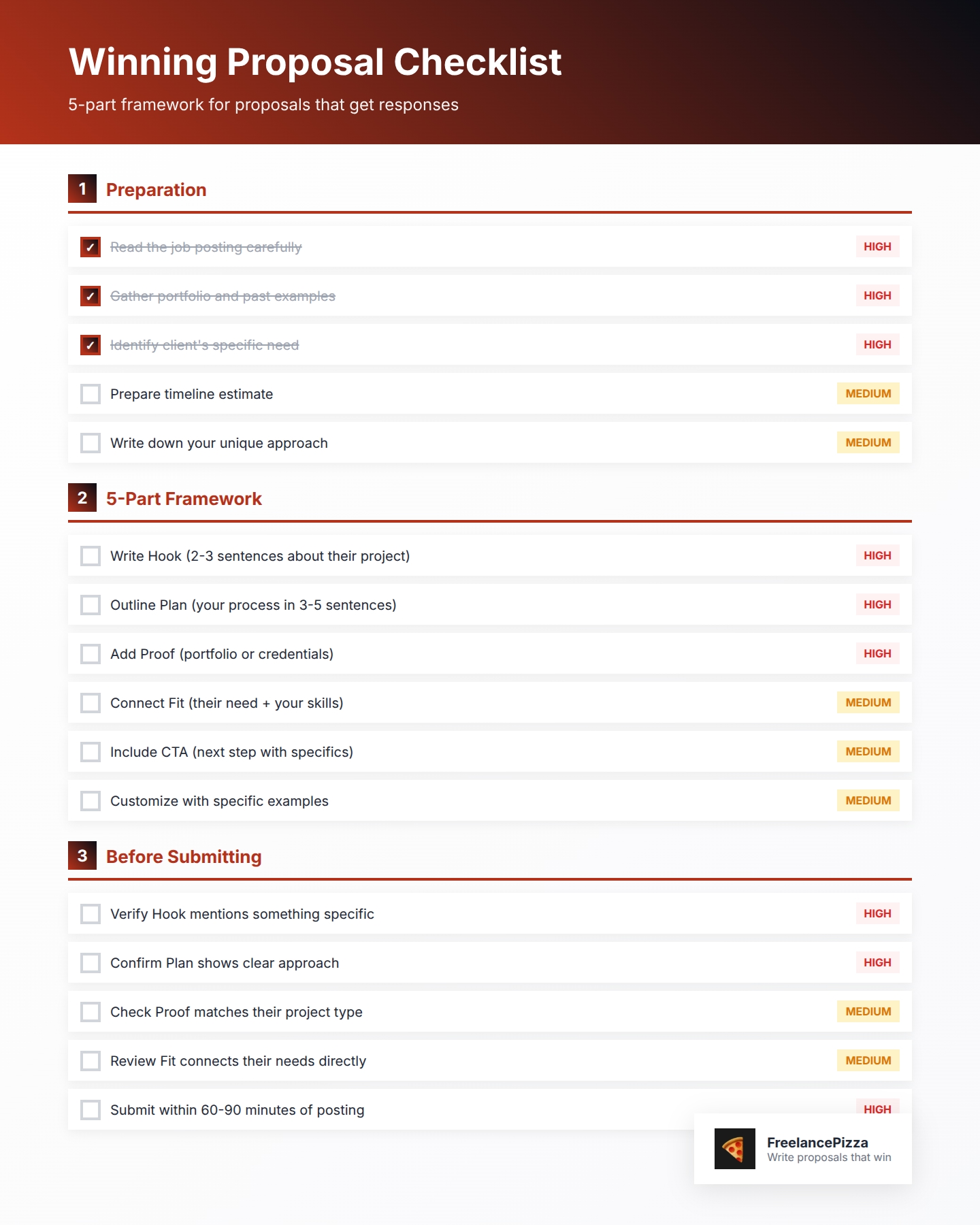
Before you hit submit, check these boxes:
Hook: Does it show you read the job posting? Does it mention something specific?
Plan: Is your approach clear? Can they picture how you'd work?
Proof: Did you show evidence (portfolio, results, or credentials)?
Fit: Did you connect their needs to your specific skills?
CTA: Is the next step obvious and easy?
One more thing: speed matters.
Research shows that proposals sent within 60-90 minutes of the job posting typically get higher response rates. The longer you wait, the more competition piles up.
Quick doesn't mean sloppy. It means: customize one of these templates, check the boxes above, and send it.
What Happens Next
You're going to send 10 proposals using these templates.
Track your responses. How many replies do you get? Which template worked best for your skill?
Expect better response rates when you include all five components. Some projects will get more replies. Some less.
The beautiful part? You're not spending two hours per proposal anymore. You're spending 10-15 minutes. That means you can send more proposals with better quality.
That's how you break the feast-and-famine cycle.
Now go write that proposal.